The use of images on the website is inevitable because of the need to insert the image everyone, regardless of whether there is any event website. But there is a downside to upload the image to the host that will be quite expensive bandwidth capacity and if you have a massive image storage, no matter if you use WordPress, the mechanism automatically generated much different picture of it cost you extra storage. So if you are using a download photos directly to the host, please refer to the optimal experience your photos in this post.
Use any image format on the website?

To take the best picture and avoid using the wrong image format to heavy website, you should define each needs to use the most appropriate image format.
Select the type of image used appropriately.
Often the images we use most often on the website are GIF, PNG-8 or PNG-24 and JPEG. Each image formats are clearly different purposes which they summarize as follows:
GIF: Use for demand loading animation on the website.
PNG-8: Using the highly detailed images and sharper but only use colors in RGB color combinations. Supported image transparent (no background).
PNG-24: Used for highly detailed images and supports a variety of colors. Supported image transparent (no background).
JPEG / JPG: common image format, can reduce image quality, support multi-colored images. But not support animations and photos throughout.
So if under the demands on, if you do not wish to use the animation should take priority PNG and JPEG image formats. If the image is less cumbersome details, please use PNG-8 instead of JPEG quality for JPEG and PNG between the PNG will have better image quality.
When to use JPEG?
If you have photos with high color, use the color gradient (gradient), use JPEG for images with gradient, colors, use JPEG will help you achieve better image quality but the image size lower than PNG and GIF.
When to use PNG images?
PNG PNG-8 and then PNG-24, in which the PNG-8 is a new image format with features such as PNG-24 but can be used in some cases to replace JPEG images such as transparent or for the few color photographs.
If you want to post high-quality photos, keep up the quality, use PNG-24 because it is a lossless compression image format is JPEG lossy compression should also be much less quality loss. However, I found, you should completely switch to using PNG-24 is not required if the animation, then use the tool to reduce the size of images lightest but better quality JPEG lot. That is why the current Thachpham.com full use PNG image if the image made by them as a screenshot for example.
Comparison between PNG and JPEG
Here are two photos of her taken by software Snagit 12 and save it as a JPEG (quality 75%) and PNG-24, you see the difference to it.
JPEG - 45KB
JPEG - 45KB
PNG - 13KB
PNG - 13KB
Please compress images before uploading website

You should compress image (reduced image size, not the size reduction) before uploading website if you do not wish to retain maximum quality. An original image compression if you can save up to 70-80% of a quality that is almost unchanged if using the naked eye, note that the PNG format you can compress better, but JPEG is compression will be less than for which it has already been compressed.
Up to 50% capacity when compressed, why not?
Up to 50% of the amount of compression, why not?
The best image compression applications
Cesium (Windows)
This software supports you compress the picture formats such as PNG, JPEG and BMP, can compress multiple photos at once in the directory, and completely free.
ImageOptim (Mac)
This is rather like an application on your Mac and use frequently in my time Mac user since it was just slightly dangerous and free. It supports you to extract some common image formats such as JPEG, PNG and GIF.
PngOptimizer (Windows)
This is a small application and now I'm used to compress PNG images.
Kraken (Web)
If you need fast image compression, compression and support features reduce the image size, the Kraken would quite suit you. You can also direct compression available from a link or compress all images in a website with Page Cruncher.
Image Compression on WordPress
If you are using WordPress and should compress the images you've uploaded to the library, you can use one of the following three great plugin.
Ewww Image Optimizer
This free plugin support is quite good compression and supports most image formats. It supports you automatically compressed when uploading photos or direct compression library.
Another reason you should use this plugin is that it supports your entire image compression on the host via WP-CLI command, so if you are using a server that is using WP-CLI to install this plugin and then tap the folder WordPress wp ewwwio help optimize for instructions.
WP Smush
The function of WP Smush similar ewww Image Optimizer, allowing self-compression and compression when uploading photos directly in the library, but it is somewhat compact and easier to use.
Kraken

If you prefer to spend their money better compression, do not spend a lot of server resources (by using external service), you can use the services of the Kraken, supports lossless image compression options or Lossy but you have to pay at least $ 5 / month.
Reduce size photos
There is one thing you should know that a picture is too big or too heavy when uploaded to the website will be quite wasteful of bandwidth and hard drive capacity of the server. For example, if you are not a photographer, or log Wallpaper is a photo posted on the website so you should only have a maximum width 1024px because if so, the user has to make something better that saw they must click on the image and then zoom out to get a new look.
Epilogue
So why the pictures on website optimization is so important and so interesting? Simply put, if not optimal, it will cost you more space to store, consuming more bandwidth so you will costs more to hire host / server. In addition, high-volume image will make the page loading speed should be affected a little picture on the website using the correct way is a better website speed.
Use any image format on the website?
To take the best picture and avoid using the wrong image format to heavy website, you should define each needs to use the most appropriate image format.
Select the type of image used appropriately.
Often the images we use most often on the website are GIF, PNG-8 or PNG-24 and JPEG. Each image formats are clearly different purposes which they summarize as follows:
GIF: Use for demand loading animation on the website.
PNG-8: Using the highly detailed images and sharper but only use colors in RGB color combinations. Supported image transparent (no background).
PNG-24: Used for highly detailed images and supports a variety of colors. Supported image transparent (no background).
JPEG / JPG: common image format, can reduce image quality, support multi-colored images. But not support animations and photos throughout.
So if under the demands on, if you do not wish to use the animation should take priority PNG and JPEG image formats. If the image is less cumbersome details, please use PNG-8 instead of JPEG quality for JPEG and PNG between the PNG will have better image quality.
When to use JPEG?
If you have photos with high color, use the color gradient (gradient), use JPEG for images with gradient, colors, use JPEG will help you achieve better image quality but the image size lower than PNG and GIF.
When to use PNG images?
PNG PNG-8 and then PNG-24, in which the PNG-8 is a new image format with features such as PNG-24 but can be used in some cases to replace JPEG images such as transparent or for the few color photographs.
If you want to post high-quality photos, keep up the quality, use PNG-24 because it is a lossless compression image format is JPEG lossy compression should also be much less quality loss. However, I found, you should completely switch to using PNG-24 is not required if the animation, then use the tool to reduce the size of images lightest but better quality JPEG lot. That is why the current Thachpham.com full use PNG image if the image made by them as a screenshot for example.
Comparison between PNG and JPEG
Here are two photos of her taken by software Snagit 12 and save it as a JPEG (quality 75%) and PNG-24, you see the difference to it.
JPEG - 45KB
JPEG - 45KB
PNG - 13KB
PNG - 13KB
Please compress images before uploading website
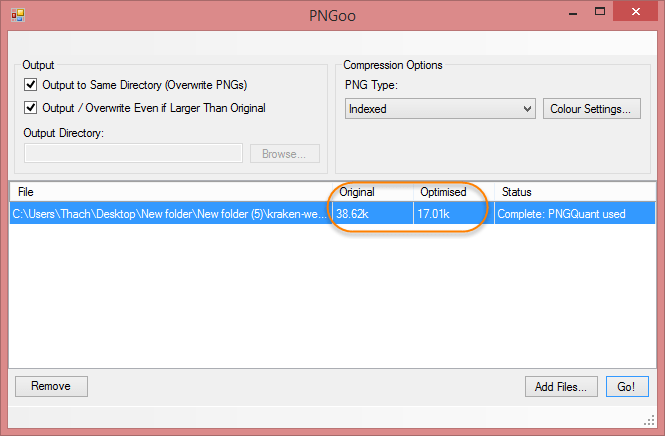
You should compress image (reduced image size, not the size reduction) before uploading website if you do not wish to retain maximum quality. An original image compression if you can save up to 70-80% of a quality that is almost unchanged if using the naked eye, note that the PNG format you can compress better, but JPEG is compression will be less than for which it has already been compressed.
Up to 50% capacity when compressed, why not?
Up to 50% of the amount of compression, why not?
The best image compression applications
Cesium (Windows)
This software supports you compress the picture formats such as PNG, JPEG and BMP, can compress multiple photos at once in the directory, and completely free.
ImageOptim (Mac)
This is rather like an application on your Mac and use frequently in my time Mac user since it was just slightly dangerous and free. It supports you to extract some common image formats such as JPEG, PNG and GIF.
PngOptimizer (Windows)
This is a small application and now I'm used to compress PNG images.
Kraken (Web)
If you need fast image compression, compression and support features reduce the image size, the Kraken would quite suit you. You can also direct compression available from a link or compress all images in a website with Page Cruncher.
Image Compression on WordPress
If you are using WordPress and should compress the images you've uploaded to the library, you can use one of the following three great plugin.
Ewww Image Optimizer
This free plugin support is quite good compression and supports most image formats. It supports you automatically compressed when uploading photos or direct compression library.
Another reason you should use this plugin is that it supports your entire image compression on the host via WP-CLI command, so if you are using a server that is using WP-CLI to install this plugin and then tap the folder WordPress wp ewwwio help optimize for instructions.
WP Smush
The function of WP Smush similar ewww Image Optimizer, allowing self-compression and compression when uploading photos directly in the library, but it is somewhat compact and easier to use.
Kraken
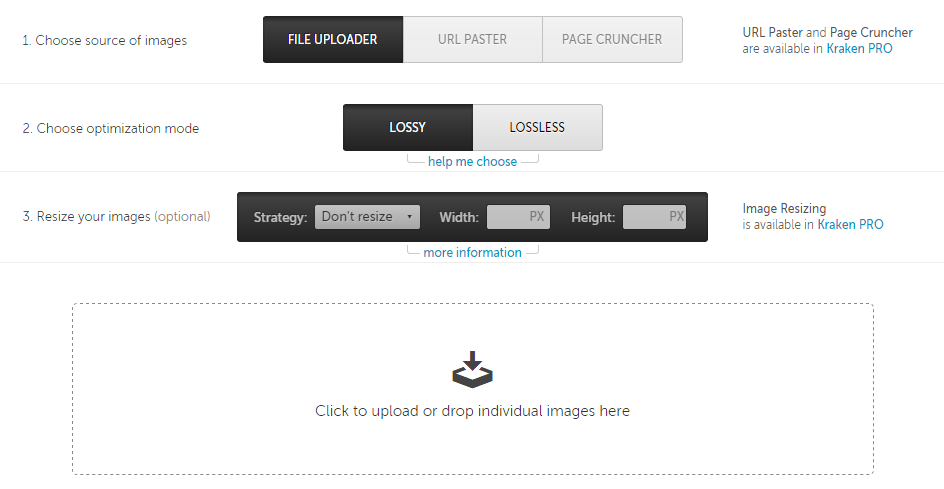
If you prefer to spend their money better compression, do not spend a lot of server resources (by using external service), you can use the services of the Kraken, supports lossless image compression options or Lossy but you have to pay at least $ 5 / month.
Reduce size photos
There is one thing you should know that a picture is too big or too heavy when uploaded to the website will be quite wasteful of bandwidth and hard drive capacity of the server. For example, if you are not a photographer, or log Wallpaper is a photo posted on the website so you should only have a maximum width 1024px because if so, the user has to make something better that saw they must click on the image and then zoom out to get a new look.
Epilogue
So why the pictures on website optimization is so important and so interesting? Simply put, if not optimal, it will cost you more space to store, consuming more bandwidth so you will costs more to hire host / server. In addition, high-volume image will make the page loading speed should be affected a little picture on the website using the correct way is a better website speed.


I was looking for help in optimizing my website images because of loading issue, Your post helped me a lot to find the best WordPress image optimizer plugin here.
ReplyDeleteGreat blog, I love this blog because of many good reasons. Get Best Background Remove Service within your affordable price.
ReplyDeleteIts really great information that you shared here, thanks, you also check my resources
ReplyDelete